Car Automation Software Checklist for Japanese Exporters: What to Automate First
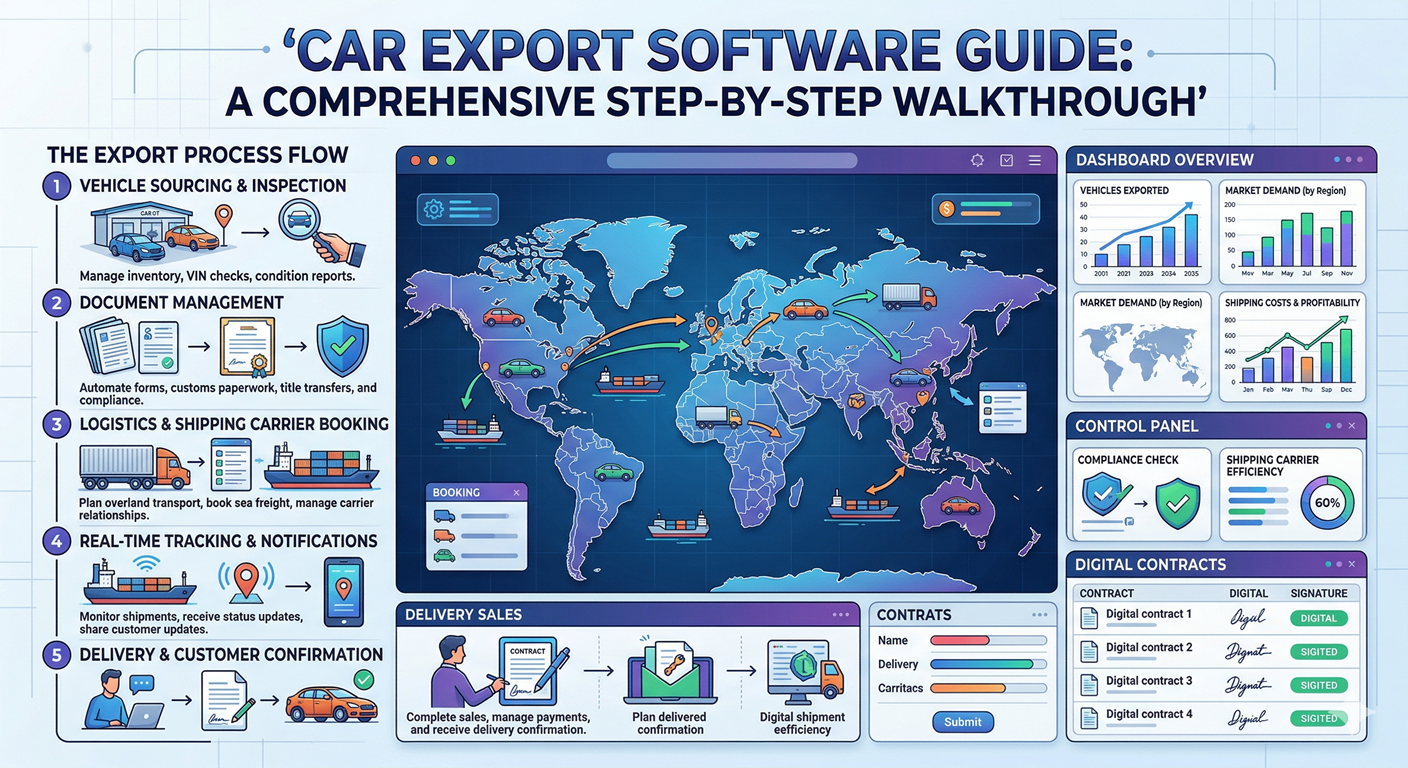
When exporters search for car automation software, they are usually not looking for abstract digital transformation language. They are trying to solve a practical operational problem: too many handoffs, too much duplicate entry, too many status questions, and too much money leaking out through avoidable delays. In Japan-based used car export operations, those problems show up every day between auction buying, stockyard intake, paperwork, booking, and buyer communication.
That is why the right first question is not, “Which software has the most features?” The better question is, “Which parts of the exporter workflow should be automated first so the business becomes more reliable without losing control?” This checklist answers that question directly for Japanese exporters, auction buyers, operations managers, and stockyard teams who want to make automation commercially useful instead of cosmetic.
The article is intentionally practical. It focuses on exporter work that starts in Japan and ends with an overseas buyer receiving a clean status update, a correct document set, and a shipment that moved without internal confusion. If you are still evaluating the broader platform picture, start with the car export automation software page and the car export software guide. If you already know your pain points, use this checklist to decide what to automate first.
Why this guide is more specific than the average software article
Serious exporter software has to support role-based access, live inventory records, transport orders, document status, and management reporting. Those are operational building blocks, not marketing extras, and they are the standard used in the checklist below.
What exporters actually mean by car automation software
In the automotive world, the phrase car automation software can mean many things. For Japanese used car exporters, however, it usually means workflow automation software for the export business itself. The vehicle is not being automated. The business process around the vehicle is being automated. That includes auction data capture, stock management, document readiness, transport coordination, buyer follow-up, approval flow, and management reporting.
This distinction matters because exporters often evaluate software with the wrong expectation. They think automation means “zero human effort.” In reality, the first win comes from reducing repeated admin work, enforcing status discipline, and making exceptions visible earlier. Your auction buyer still decides what to purchase. Your yard team still inspects and prepares units. Your logistics staff still handles booking decisions. Automation simply removes the waste around those decisions so the team spends less time retyping, reconciling, and chasing updates.
A good test is simple: if one vehicle is purchased today, can your team see the same live record move through buying, intake, yard status, documents, shipment preparation, and buyer delivery without rebuilding the story in spreadsheets? If the answer is no, you do not yet have meaningful automation. You only have digital fragments.
Why exporters should not automate everything at once
One of the most common rollout mistakes is trying to automate every process immediately. That usually creates resistance inside the team because the system becomes too heavy before it becomes useful. Japanese exporters do better when they start with the handoffs that create the most confusion or commercial risk. In most businesses, that means auction capture, status visibility, document readiness, shipment milestones, and buyer updates before deeper workflow customization.
The reason is operational, not technical. Early automation should answer the questions management asks most often: What did we buy? Where is the unit now? What is missing before shipment? Which buyers need updates? Which orders are blocked? Once those questions are answered reliably, the organization becomes more willing to adopt additional controls like approvals, branch-level permissions, exception alerts, and deeper analytics.
This is also how you avoid the failure pattern described in manual vs software car export systems. The system must solve a visible operational problem early, or staff will return to spreadsheets and side chats even if the software itself is technically capable.
The 12 workflow checkpoints exporters should automate first
1. Auction lot capture and source tracking
The first automation priority is consistent lot capture. Every purchased vehicle should enter the system with auction source, lot details, condition notes, expected fees, and ownership context attached to the same record. Without that foundation, every downstream team works from partial information. When lot capture is automated or standardized, buyers stop rebuilding the same record later and operations can trust the purchase data from the start.
2. Maximum bid and landed-cost calculation
Exporters lose margin long before shipment if maximum bid logic is unclear. A serious workflow should calculate the cost stack before the bid becomes a commitment: vehicle cost, auction fee, inland transport, yard work, document processing, and route assumptions. This is why automation should connect purchasing to pricing discipline. If your team still calculates the ceiling manually in separate sheets, the business is inviting inconsistent buying behavior.
3. Vehicle intake and inventory creation
Once a unit is secured, it must become a real inventory record immediately, not when someone has time later. The intake workflow should create the live unit record with chassis or VIN details, source, buyer context if pre-sold, status, and initial location. This is where many exporters start to feel the difference between generic business software and a proper exporter platform. The inventory record is not just a stock item. It becomes the operational backbone of the shipment.
4. Photo, inspection, and condition visibility
Automation should also standardize how photos and inspection observations are attached to the vehicle record. If the unit changes hands from buyer to operations to yard staff without clear evidence of condition, disputes appear later. This is especially important for exporters serving multiple destination markets where quality expectations vary. A clean photo and condition workflow makes internal decisions faster and buyer communication more credible.
5. Stockyard location and readiness status
A surprising amount of exporter waste comes from not knowing exactly where a unit is or what state it is in. Yard visibility should therefore be automated early: gate-in confirmation, actual location, preparation stage, hold reasons, and release readiness. If you need a deeper operational view, the companion guide on stockyard management for car exporters explains why location discipline is not a yard problem alone. It affects documents, booking, buyer trust, and cash conversion.
6. Document readiness checkpoints
Export operations often feel delayed because shipment teams discover document gaps too late. The better approach is to automate readiness checkpoints, not just file storage. The system should show whether invoices, certificates, booking-related papers, and release prerequisites are complete for each unit or shipment group. This is one of the clearest differences between document automation and document dumping. A file folder is not a workflow.
7. Shipment booking preparation
Booking logic should not begin with a phone call and a hope that the unit is ready. Exporters need workflow automation that shows booking candidates, missing prerequisites, route assumptions, and decision owners. When booking preparation is automated, logistics teams stop working from guesswork. They can see which units are clean for RoRo, which are suitable for container loading, and which are still blocked by documents or yard status. That reduces last-minute vessel pressure and unplanned rework.
8. Buyer communication milestones
Automation should not stop at internal operations. Overseas buyers judge exporter professionalism by the quality of updates they receive. Quote accepted, vehicle purchased, in yard, documents in process, booked, loaded, departed, arrived: these are buyer-facing milestones that should come from the same live record, not from improvised messages. If your staff still writes every update manually, use automation to standardize what is sent, when it is sent, and which events trigger it.
9. Payment and approval checkpoints
Automation is most useful when it protects money. Exporters should track deposit status, buyer payment milestones, approval needs, and internal release authority inside the same operational system. This is not finance theater. It keeps operations from moving units forward when commercial prerequisites are still open. For businesses growing into multiple users or branches, role-based approval flow becomes a necessary control, not a luxury.
10. Exception alerts and blocked-order visibility
Automation should reveal what is blocked, not only what is complete. Missing document, delayed yard release, unconfirmed inland move, payment gap, booking delay, inconsistent chassis data: these are exceptions that deserve automatic visibility. Many exporters operate as if the team is efficient, when in reality managers simply spend their day detecting problems manually. A healthy workflow uses alerts to surface the exceptions early and reduce constant status chasing.
11. Role-based permissions and audit history
A proper exporter system should know who is allowed to change what and should retain a clear action trail. The reason is simple: once multiple buyers, yard staff, logistics coordinators, finance people, and managers touch the same vehicle record, uncontrolled editing becomes a hidden source of operational risk. Car automation software should therefore automate permission boundaries as well as workflow steps. Otherwise the system centralizes data while still spreading accountability.
12. Weekly reporting and management review
The final early automation priority is management reporting. Exporters should not wait until month-end to understand what is stuck, aging, delayed, or underperforming. A weekly view of purchased units, shipped units, stock age, blocked orders, document delay, buyer payment lag, and route-level issues creates much stronger operational discipline. This is where automation starts to become a competitive advantage rather than just an admin tool.
How to prioritize the checklist by business stage
Not every exporter should implement the same sequence. A smaller business handling modest monthly volume usually needs tighter buying, inventory, and buyer-update control first. A growing company with more yard movement and more active orders usually needs stronger document and booking readiness. A larger or multi-branch exporter usually feels the greatest benefit from approvals, permissions, exception alerts, and reporting because coordination risk rises faster than volume itself.
Early-stage exporters
Start with lot capture, landed cost, vehicle intake, and buyer updates. These four areas reduce confusion quickly and improve commercial control without overwhelming the team.
Growing operations teams
Add stockyard status, document readiness, booking preparation, and blocked-order alerts. This is the stage where manual handoffs begin to hurt throughput visibly.
Multi-user or multi-branch exporters
Prioritize permissions, approvals, audit history, weekly reporting, and route-level management views. These are governance controls that keep scale from turning into noise.
What a serious automation platform needs behind the screens
Exporters often evaluate software based on visible screens only. That is understandable, but it is incomplete. A system can look polished and still fail in day-to-day use if the underlying structure is weak. In exporter operations, the critical backbone usually includes a durable inventory record, a transport or shipment workflow, role-based user control, and a reporting layer that exposes live exceptions instead of static reports. Without those building blocks, the team ends up creating side systems around the platform and the automation promise weakens quickly.
That is why buyers should ask operational demo questions rather than design questions. Can one vehicle record hold auction context, photos, status, documents, and shipment milestones? Can a manager see what changed, by whom, and when? Can logistics work from the same live record as operations? Can the platform separate access for admin, yard, finance, and logistics teams? These are the questions that reveal whether the software is truly built for exporter workflow automation.
If those foundations are weak, the system may still help somewhat, but it will not become the operating system your business needs. That is especially important for teams comparing car export management software with lighter tools that only solve one part of the workflow.
A realistic 60-day rollout plan
The best first rollout is disciplined, not dramatic. In the first 30 days, define statuses, ownership, required vehicle fields, and the minimum document checkpoints that matter for shipment control. At the same time, start using the platform for all new purchases so the team creates a clean habit on live units instead of trying to fix everything from history first.
From day 30 to day 60, add yard visibility, booking readiness logic, buyer milestones, and weekly management review. Once the team trusts the system for current operations, you can migrate more historical stock, build deeper reporting rules, and formalize approvals. The goal is not to finish every configuration immediately. The goal is to make the workflow more reliable every week.
This staged approach is usually more effective than a big-bang rollout because the team experiences faster wins. When staff stop answering the same status questions repeatedly, adoption improves because the system is clearly saving time rather than adding process for its own sake.
What exporters should not automate first
Many teams waste their first automation budget on the wrong layer. They automate the part of the workflow that looks modern in a demo rather than the part that actually causes operational drag. A good example is polished customer messaging without strong internal status control. If the system still cannot tell the team whether a unit is truly ready, customer communication automation will only distribute weak information more efficiently. The same problem appears when exporters invest in advanced analytics before their source data is consistent. Reporting becomes visually impressive but operationally unreliable.
Exporters should also avoid over-automating rare exceptions in the early phase. Complex approval trees, deep customization for unusual routes, or edge-case workflow branches can wait until the core sequence is stable. Your first automation layer should improve work that happens every day: purchase capture, inventory status, document readiness, booking preparation, and buyer milestones. Once those routine stages are clean, more specialized automation becomes easier to design because the business understands its real process better.
A useful test is this: if removing the manual effort around a process would not noticeably reduce repeated questions, delay risk, or customer friction this month, it probably should not be your first automation priority.
Questions to ask in a software demo before rollout
A serious exporter should not evaluate automation software only by the feature menu. Ask the vendor to show one live vehicle moving from purchase through inventory, yard, documents, booking, and buyer communication. Ask who can edit each stage, how exceptions are flagged, and whether reporting reflects blocked work in real time. Ask how the platform behaves when two departments touch the same unit on the same day. Ask what happens when a booking is planned but a document requirement remains incomplete. These workflow questions reveal more than a polished dashboard ever will.
You should also ask implementation questions. How long does it take to define statuses and roles? Can the platform support your branch structure or destination-market variation? How are historical units imported? What is the recommended first-stage rollout? Can management see an audit trail for critical changes? For exporters comparing automation-specific solutions with broader platforms, these questions often determine whether the system will become an operating backbone or just another tool sitting beside spreadsheets.
In other words, the best demo is not the one that looks the smoothest. It is the one that proves your real workflow can operate with less friction once the software is live.
External references exporters should keep in view
Automation improves internal execution, but exporters still operate inside a larger trade and compliance environment. That is why operations managers should monitor external sources such as JETRO, Japan Customs, and Japan's Ministry of Land, Infrastructure, Transport and Tourism. Those sources do not tell you how to design your internal workflow, but they help teams stay aligned with the transport and export context surrounding that workflow.
The practical point is simple: exporter automation should make your internal process cleaner while keeping your decisions connected to the real shipping, customs, and market environment outside the system.
Suggested image alt text for this article
- • Car automation software checklist for Japanese used car exporters
- • Export workflow automation dashboard showing auction, inventory, documents, and shipping status
- • Auction-to-shipment workflow checklist for Japan car export operations teams
Related guides for automation planning
Auction-to-shipment automation
See how exporters remove manual handoffs between buying, yard, documents, and booking.
Car export workflow automation bottlenecks
Review the 15 bottlenecks exporters should fix first as volume grows.
Problems in car export business
Map common exporter pain points to the workflow controls that solve them.
Manual vs software car export systems
Use this comparison if your team is still split between spreadsheets and system-led workflow.
Related Solutions
Explore the product pages behind this checklist
Car export automation software
See how SmartApp handles automation across auction-to-shipment workflow, permissions, and reporting.
Car export management software
Review the broader operational platform for inventory, documents, buyer management, and shipment control.
Car export software features
Compare the modules that matter most when your team moves from manual handoffs to structured workflow.
Frequently asked questions
What should car automation software automate first for Japanese exporters?
Will automation replace the export operations team?
How do exporters avoid buying software that looks good but fails in real operations?
Ready to apply automation where it actually changes exporter performance?
The right automation sequence gives your team cleaner buying control, clearer inventory status, fewer document surprises, and more reliable buyer communication.
If you want a platform built around Japanese exporter workflow rather than generic admin software, the next step is to review the automation flow in a live product context.
Book a Free Demo